4. Finite Automata#
Learning Objectives#
After completing this chapter, you will be able to:
Define a finite automaton.
Represent a finite automaton with a state diagram or a transition table.
Work with and understand a finite automaton class built in Python.
Define a language with a finite automaton.
1. Basic Concepts and Definitions#
Let’s talk about games.
In the United States two popular games for children are Candyland and Chutes and Ladders. You may have played them when you were a kid. The basic idea for both is very simple - you move along a sequence of squares by either drawing cards or rolling dice, and the goal is to get to the end of the sequence. It’s a race, but there’s no strategy involved - whether you win or lose is entirely up to the luck of either the draw or the roll. It’s good for little children, and it teaches them to follow directions and pay attention, but its appeal is limited because it’s not possible to get “good” at playing the game.
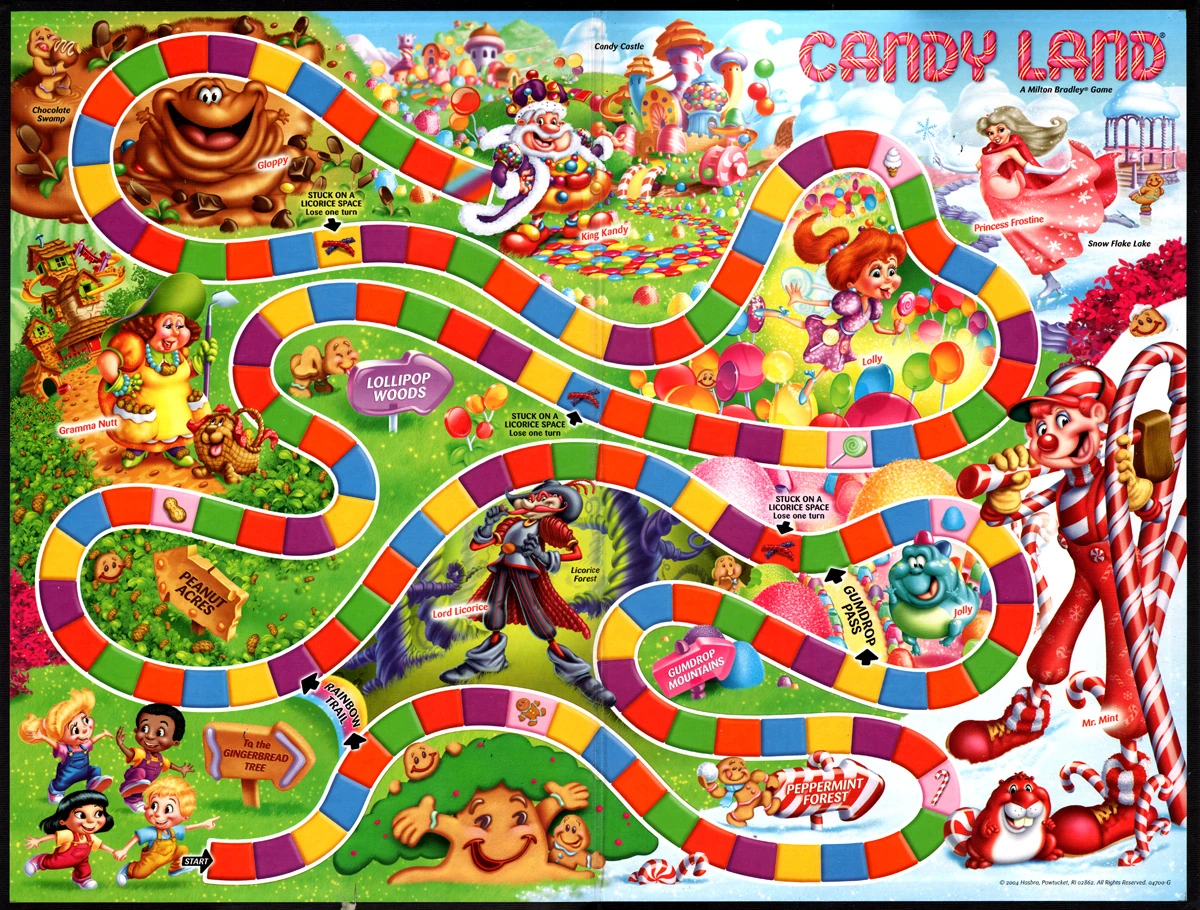
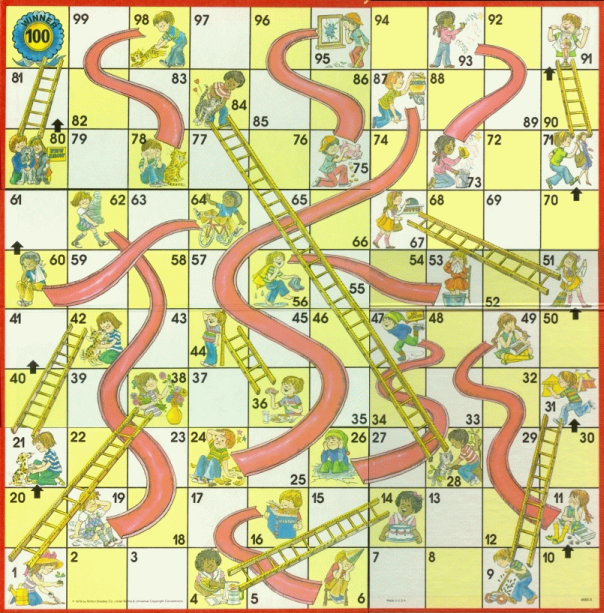
What are some things these games have in common? Well, they both involve:
A finite set of states, one of which is designated as the initial state, called the start state, and some of which are designated winning or final states.
A set of possible inputs. In these cases, either the draw of a card or the roll of a dice.
A finite set of transitions that tell you for each state and for each input which state to go to next.
Well, this is, essentially, the definition of a finite automaton (FA for short). It’s finite because the number of possible states and possible inputs is finite, and automaton because the change of states is totally governed by the input. In other words, it’s automatic - there is no choice involved. (“Automaton” comes from Greek, and its correct plural is “automata”). The formal definition is below.
Definition
A finite automaton consists of:
A finite set of states \(\displaystyle Q\).
A finite set \(\displaystyle \Sigma\) of input characters, called its alphabet.
A transition function \(T\), where for every state \(q \in Q\) and input character \(a \in \Sigma\) there is a transition map \(T(q,a) \rightarrow q'\) specifying the next state after the automaton in state \(q\) reads the input \(a\).
A unique initial state \(q_{0}\)
A subset \(F \subseteq Q\) of final states. Note the set of final states could possibly be empty, possibly have more than one element, and possibly contain the initial state.
This \(5\)-tuple, \((Q,\Sigma,T,q_{0},F)\) defines a finite automaton.
2. Representing Finite Automata#
Let’s suppose we have a much simpler game than either Candyland or Chutes and Ladders. Instead of rolling a dice we just flip a coin, so the possibilities at any state are just heads and tails. In other words, our input alphabet is just \(\Sigma = \{H,T\}\). Our board looks like this:
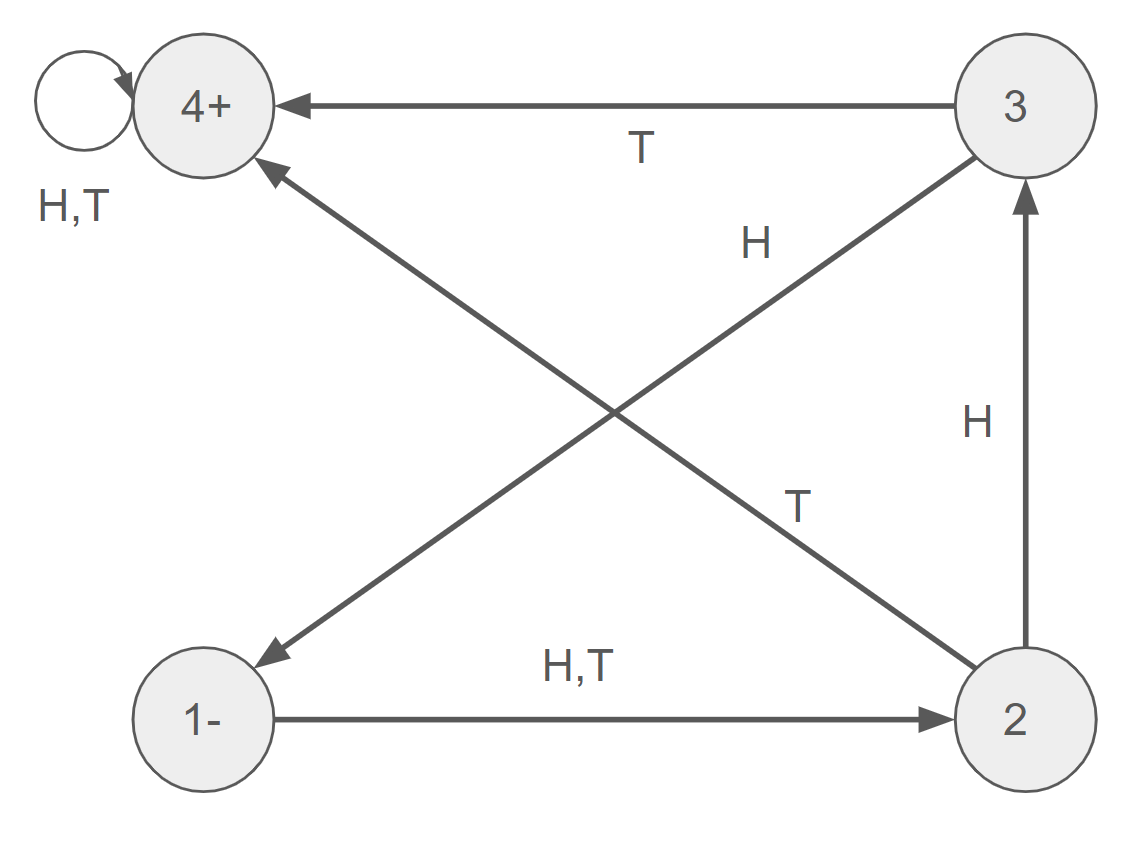
The idea here is that:
The game starts at the initial state \(1\).
On the first flip of the coin, the player advances to state \(2\) for anything they flip.
At state \(2\), if the player flips \(T\) they take a ladder to the final state \(4\). If the player flips \(H\), they advance to state \(3\).
At state \(3\), if the player flips \(H\) they take a chute back to the initial state \(1\). For \(T\), they advance to the final state \(4\).
If, for some reason, the player wants to keep playing at the final state, they just stay there for any coin flip.
In the board diagram, the circles (or nodes) are the different states, and the arrows marked with letters represent how those input letters transition between states. The initial state is marked with \(-\), and the final states are makred with \(+\). This is the basic idea behind the state diagram of a finite automaton, which is a compact and illuminating way of representing all its features.
We could also represent the board using a transition table. Specifically, the rows of the table correspond with the states of the finite automaton, the columns correspond with the possible inputs (the alphabet), and the entries represent the transitions:
State |
H |
T |
|---|---|---|
1 |
2 |
2 |
2 |
3 |
4 |
3 |
1 |
4 |
4 |
4 |
4 |
3. Representing Finite Automata in Python#
We can diagram a finite automaton in Python using the Digraph class from the graphviz library. The Source class lets us visualize it.
from graphviz import Digraph, Source
We can create a class (we’ll call it cal for “Chutes and Ladders”), and then specify the states and the transitions (called nodes and edges in the Digraph class).
cal = Digraph()
cal.attr(rankdir='LR') # This specifies the diagram should go left to right

# States
cal.node('1-', shape='circle') # Initial state
cal.node('2', shape='circle')
cal.node('3', shape='circle')
cal.node('4+', shape='circle') # Accept state

# Transitions
cal.edge('1-', '2', label='H,T')
cal.edge('2', '3', label='H')
cal.edge('2', '4+', label='T')
cal.edge('3', '1-', label='H')
cal.edge('3', '4+', label='T')
cal.edge('4+', '4+', label='H,T')
Source(cal.source)
Another way you’ll frequently see finite automaton state diagram is with the initial state represented by an incoming arrow that doesn’t start on any node, and the final states represented by a double circle node. Using these conventions, the state diagram above would look like:
cal2 = Digraph()
cal2.attr(rankdir='LR') # This specifies the diagram should go left to right

# Start arrow
cal2.node('', shape='none')
cal2.edge('', '1')

# States
cal2.node('1', shape='circle') # Initial state
cal2.node('2', shape='circle')
cal2.node('3', shape='circle')
cal2.node('4', shape='doublecircle') # Accept state

# Transitions
cal2.edge('1', '2', label='H,T')
cal2.edge('2', '3', label='H')
cal2.edge('2', '4', label='T')
cal2.edge('3', '1', label='H')
cal2.edge('3', '4', label='T')
cal2.edge('4', '4', label='H,T')
Source(cal2.source)
Now, let’s create a finite automaton Python class. In order to define a finite automaton, we need to provide the tuple described in the definition from section 1.3.1.
class FA:
    def __init__(self, states, alphabet, transition_function, start_state, accept_states):
        self.states = set(states)
        self.alphabet = set(alphabet)
        self.transition_function = transition_function
        self.start_state = start_state
        self.accept_states = set(accept_states)

        self.validate()
This initializes a DFA class, with a set of states, an alphabet (set of characters), transition functions, a start state, and a set of accept states. It also runs a validate method to make sure it’s a proper tuple and the definition makes sense. This validate method is provided below:
def validate(self):
  if self.start_state not in self.states:
    raise ValueError("Start state must be in states.")
  if not self.accept_states.issubset(self.states):
    raise ValueError("Accept states must be a subset of states.")

  # Ensure total transition function
  for state in self.states:
    for symbol in self.alphabet:
      if (state, symbol) not in self.transition_function:
        raise ValueError(f"Missing transition for state '{state}' on symbol '{symbol}'.")

  # Ensure all transitions are to valid states and symbols
  for (state, symbol), next_state in self.transition_function.items():
    if state not in self.states or next_state not in self.states:
      raise ValueError(f"Invalid transition: ({state}, {symbol}) → {next_state}")
    if symbol not in self.alphabet:
      raise ValueError(f"Symbol '{symbol}' not in alphabet.")

FA.validate = validate
This method makes sure that:
The specified start states is in the set of states.
The specified end states are a subset of the set of states.
There is a transition for every state and character in the alphabet.
All transitions are to and from states within the set of states.
We can test this by creating the Chutes and Ladders FA from above:
cal = FA(
    states={'1', '2', '3', '4'},
    alphabet={'H', 'T'},
    transition_function={
        ('1', 'H'): '2',
        ('1', 'T'): '2',
        ('2', 'H'): '3',
        ('2', 'T'): '4',
        ('3', 'H'): '1',
        ('3', 'T'): '4',
        ('4', 'H'): '4',
        ('4', 'T'): '4'
    },
    start_state='1',
    accept_states={'4'}
)
If we were to change this by specifying the start state to be “42”, the validate method will raise an error, as “42” is not in the set of states.
adams = FA(
    states={'1', '2', '3', '4'},
    alphabet={'H', 'T'},
    transition_function={
        ('1', 'H'): '2',
        ('1', 'T'): '2',
        ('2', 'H'): '3',
        ('2', 'T'): '4',
        ('3', 'H'): '1',
        ('3', 'T'): '4',
        ('4', 'H'): '4',
        ('4', 'T'): '4'
    },
    start_state='42',
    accept_states={'4'}
)
Let’s also create a method that builds and returns the Digraph for the state diagram of the finite automaton. We’ll use the second convention above, with the initial state represented with an incoming arrow without a source node, and the finial states represented by double circles.
def build_graph(self):
  dot = Digraph()
  dot.attr(rankdir='LR')
  dot.node('', shape='none')
  dot.edge('', self.start_state)

  for state in self.states:
    shape = 'doublecircle' if state in self.accept_states else 'circle'
    dot.node(state, shape=shape)

  for (src, symbol), dst in self.transition_function.items():
    dot.edge(src, dst, label=symbol)

  return dot

FA.build_graph = build_graph
We’ll also add a method for building and then displaying the state diagram.
def show(self):
  dot = self.build_graph()
  display(Source(dot.source))

FA.show = show
Let’s use these methods to display the state diagram for the Chutes and Ladders finite automaton.
cal.show()
Note that here we haven’t simplified things by having, for example, a single arrow from 1 to 2 with \(H,T\) above it, and have instead explicitly separated the \(H\) and \(T\) transitions.
class DFA:
    def __init__(self, states, alphabet, transition_function, start_state, accept_states):
        self.states = set(states)
        self.alphabet = set(alphabet)
        self.transition_function = transition_function
        self.start_state = start_state
        self.accept_states = set(accept_states)

        self._validate()

    def _validate(self):
        if self.start_state not in self.states:
            raise ValueError("Start state must be in states.")
        if not self.accept_states.issubset(self.states):
            raise ValueError("Accept states must be a subset of states.")

        # Ensure total transition function
        for state in self.states:
            for symbol in self.alphabet:
                if (state, symbol) not in self.transition_function:
                    raise ValueError(f"Missing transition for state '{state}' on symbol '{symbol}'.")

        # Ensure all transitions are to valid states and symbols
        for (state, symbol), next_state in self.transition_function.items():
            if state not in self.states or next_state not in self.states:
                raise ValueError(f"Invalid transition: ({state}, {symbol}) → {next_state}")
            if symbol not in self.alphabet:
                raise ValueError(f"Symbol '{symbol}' not in alphabet.")

    def accepts(self, input_string):
        current_state = self.start_state
        for symbol in input_string:
            if symbol not in self.alphabet:
                raise ValueError(f"Symbol '{symbol}' not in DFA alphabet.")
            current_state = self.transition_function[(current_state, symbol)]
        return current_state in self.accept_states

    def trace(self, input_string):
        trace = [self.start_state]
        current_state = self.start_state
        for symbol in input_string:
            if (current_state, symbol) not in self.transition_function:
                trace.append(None)
                break
            current_state = self.transition_function[(current_state, symbol)]
            trace.append(current_state)
        return trace

    def visualize(self, filename='dfa', format='png'):
        """Save DFA visualization to a file."""
        dot = self._build_graph()
        dot.render(filename, format=format, cleanup=True)
        print(f"DFA visualization saved as {filename}.{format}")

    def show(self):
        """Display DFA inline in a Jupyter notebook."""
        dot = self._build_graph()
        display(Source(dot.source))

    def _build_graph(self):
        dot = Digraph()
        dot.attr(rankdir='LR')
        dot.node('', shape='none')
        dot.edge('', self.start_state)

        for state in self.states:
            shape = 'doublecircle' if state in self.accept_states else 'circle'
            dot.node(state, shape=shape)

        for (src, symbol), dst in self.transition_function.items():
            dot.edge(src, dst, label=symbol)

        return dot
4. Finite Automata and Languages#
For the simple game above we can ask, for a given sequence of flips, whether the player wins the game - meaning whether at the end of the sequence the player is on the final state. For the sequence \(HHHT\) the answer would be no. For the sequence \(THT\), the answer would be yes. We can view the set of winning sequences of flips as a language, and we say the game - or finite automaton - above accepts this language.
For any finite automaton with input alphabet \(\Sigma\), we can view a sequence of characters from \(\Sigma\) as corresponding with a sequence of transitions in the finite automaton. The automaton begins at its start state, reads the first character in the string, transitions to one of its states according to the character and its transition function, and then repeats. This process continues until the finite automaton has read every character in the string. If at this point the finite automaton is in a final state, the string is accepted. If not, the string is rejected. We say a string that is accepted by a finite automaton is recognized by that finite automaton.
Definition
For a finite automaton with an input alphabet \(\Sigma\), the set of strings over \(\Sigma\) that are recognized by that finite automaton is the language defined by that finite automaton.
Example 1 - Build a finite automaton with input alphabet \(\Sigma = \{0,1\}\) that accepts any bitstring (a string of \(0\)s and \(1\)s) that ends in a \(1\).
Example 1 Solution - The language defined by the finite automaton below is the requested language.
lastone = FA(
    states={'q0', 'q1'},
    alphabet={'0', '1'},
    transition_function={
        ('q0', '0'): 'q0',
        ('q0', '1'): 'q1',
        ('q1', '0'): 'q0',
        ('q1', '1'): 'q1',
    },
    start_state='q0',
    accept_states={'q1'}
)

lastone.show()
Example 2: Build an FA that accepts only those words that begin or end with a double letter.
Example 2 Solution -
doubleletter = FA(
    states={'q0', 'q1', 'q2', 'q3', 'q4', 'q5', 'q6', 'q7', 'q8'},
    alphabet={'a', 'b'},
    transition_function={
        ('q0', 'a'): 'q3',
        ('q0', 'b'): 'q1',
        ('q1', 'a'): 'q5',
        ('q1', 'b'): 'q2',
        ('q2', 'a'): 'q2',
        ('q2', 'b'): 'q2',
        ('q3', 'a'): 'q4',
        ('q3', 'b'): 'q6',
        ('q4', 'a'): 'q4',
        ('q4', 'b'): 'q4',
        ('q5', 'a'): 'q7',
        ('q5', 'b'): 'q6',
        ('q6', 'a'): 'q5',
        ('q6', 'b'): 'q8',
        ('q7', 'a'): 'q7',
        ('q7', 'b'): 'q6',
        ('q8', 'a'): 'q5',
        ('q8', 'b'): 'q8',
    },
    start_state='q0',
    accept_states={'q2', 'q4', 'q7', 'q8'}
)

doubleletter.show()
5. Using Finite Automata In Python#
In Section 1.3.3 we created some classes for implementing finite automata in Python and for visualizing their state diagram. We may now want to know for a given finite automaton whether it accepts a given string over its input alphabet. Let’s build a method for answering this question, and for tracing through the states encountered by the finite automaton as it processes an input string.
# Method for determining whether an input string is accepted by the finite automaton.
def accepts(self, input_string):
  current_state = self.start_state
  for symbol in input_string:
    if symbol not in self.alphabet:
      raise ValueError(f"Symbol '{symbol}' not in FA alphabet.")
    current_state = self.transition_function[(current_state, symbol)]
  return current_state in self.accept_states

FA.accepts = accepts
# Method for tracing through the sequence of states of the finite automaton as it processes an input string.
def trace(self, input_string):
  trace = [self.start_state]
  current_state = self.start_state
  for symbol in input_string:
    if (current_state, symbol) not in self.transition_function:
      trace.append(None)
      break
    current_state = self.transition_function[(current_state, symbol)]
    trace.append(current_state)
  return trace

FA.trace = trace
We can try these methods out on the finite doubleletter finite automaton we created above.
doubleletter.accepts('abbabaab')
doubleletter.accepts('abbabaabb')
doubleletter.accepts('aabbabaab')
The first string neither begins nor ends with a double letter, and so is not accepted. The second string ends with a double letter, and so is accepted. The third string begins with a double letter, and so is accepted.
If we wanted to trace out the sequence of states of the doubleletter finite automaton as it reads the string “abbabaab” we can use the trace method.
doubleletter.trace('abbabaab')
Example 3 - What is the sequence of states visited by the doubleletter finite automaton for the input string “abbabbaab”?
Example 3 Solution -
doubleletter.trace('abbabbaab')
It’s last state, ‘q6’, is not an accepting state, and so the string would not be accepted.
doubleletter.accepts('abbabbaab')
NOTE - The way we’ve designed the finite automaton class, by first specifying the class and its constructor, and then adding methods in later cells, is not best practice. We’d usually want to build all the methods we need into the initial class definition. We chose to introduce the methods one at a time for teaching purposes, but an implementation of the FA class with all the methods included in its initial definition can be found in the appendix at the end of this notebook (Section 1.3.8).
6. Practice Exercises#
NOTE - For the following exercises the input alphabet is always \(\Sigma = \{a,b\}\). For each of these you should create the state diagram and / or transition table on your own, then create the corresponding finite automaton as an FA object in Python, then verify the given word is accepted by the FA object.
Exercise 1: Create a state diagram and a transition table for an FA that accepts only the words \(baa\), \(ab\), and \(abb\) and no other words.
Word - “abb”.
Exercise 2: Create a state diagram for an FA that accepts only those words that have more than four letters.
Word - “abbaba”.
Exercise 3: Create a state diagram for an FA that accepts only those words that have fewer than four letters.
Word - “bab”.
Exercise 4: Create a state diagram for an FA that accepts only those words with exactly four letters.
Word - “abba”.
7. Further Reading#
Introduction to Computer Theory (Second Edition) by Daniel I.A. Cohen
Chapter 5 - Finite Automata
Automata Theory, Languages, and Computation (Third Edition) by Hopcroft, Motwani, and Ullman
Chapter 2 - Finite Automata
Introduction to the Theory of Computation (Third Edition) by Michael Sipser
Section 1.1 - Finite Automata
More on graphviz
8. Appendix: The FA Class with All Methods#
To use and run, remove the comments.
'''
class FA:
    def __init__(self, states, alphabet, transition_function, start_state, accept_states):
        self.states = set(states)
        self.alphabet = set(alphabet)
        self.transition_function = transition_function
        self.start_state = start_state
        self.accept_states = set(accept_states)

        self._validate()

    def _validate(self):
        if self.start_state not in self.states:
            raise ValueError("Start state must be in states.")
        if not self.accept_states.issubset(self.states):
            raise ValueError("Accept states must be a subset of states.")

        # Ensure total transition function
        for state in self.states:
            for symbol in self.alphabet:
                if (state, symbol) not in self.transition_function:
                    raise ValueError(f"Missing transition for state '{state}' on symbol '{symbol}'.")

        # Ensure all transitions are to valid states and symbols
        for (state, symbol), next_state in self.transition_function.items():
            if state not in self.states or next_state not in self.states:
                raise ValueError(f"Invalid transition: ({state}, {symbol}) → {next_state}")
            if symbol not in self.alphabet:
                raise ValueError(f"Symbol '{symbol}' not in alphabet.")

    def accepts(self, input_string):
        current_state = self.start_state
        for symbol in input_string:
            if symbol not in self.alphabet:
                raise ValueError(f"Symbol '{symbol}' not in DFA alphabet.")
            current_state = self.transition_function[(current_state, symbol)]
        return current_state in self.accept_states

    def trace(self, input_string):
        trace = [self.start_state]
        current_state = self.start_state
        for symbol in input_string:
            if (current_state, symbol) not in self.transition_function:
                trace.append(None)
                break
            current_state = self.transition_function[(current_state, symbol)]
            trace.append(current_state)
        return trace

    def show(self):
        """Display DFA inline in a Jupyter notebook."""
        dot = self._build_graph()
        display(Source(dot.source))

    def _build_graph(self):
        dot = Digraph()
        dot.attr(rankdir='LR')
        dot.node('', shape='none')
        dot.edge('', self.start_state)

        for state in self.states:
            shape = 'doublecircle' if state in self.accept_states else 'circle'
            dot.node(state, shape=shape)

        for (src, symbol), dst in self.transition_function.items():
            dot.edge(src, dst, label=symbol)

        return dot
''';